Change default PDF App
Creation date: 8/03/2022 10:24 AM
Updated: 8/03/2022 10:24 AM
To change the default app to open PDF's please follow the below screenshots.
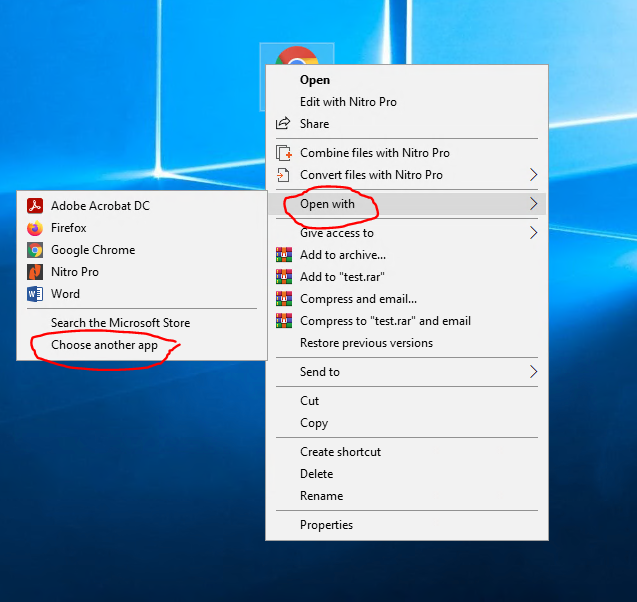
On the desktop of the screen please right click anyone of the PDF's that you wish to open with a different app. This might be shown as an icon different to the default as shown below. The icon in this case is shown below as Google Chrome as the default app has been changed. Once you have right clicked the icon then select "Open With" and then select "Choose another app"
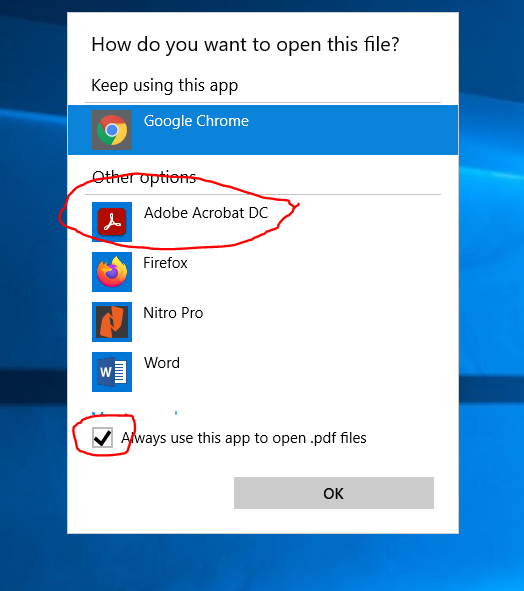
On the next page select the desired app and tick the box to always use this app. Click "Ok" and all the files associated with the app will automatically update and open with the desired app selected.
DataImage61.png
DataImage61.png